

How to Send an Interview Invitation from the Hunter AI Recruitment System?

How to Send an Interview Invitation from the Hunter AI Recruitment System?

The Hunter AI recruitment system lets you manage the candidate interview invitation process in a smart, centralized, and efficient way — without leaving the interface or using your personal email.
Using smart communication management tools, you can easily invite candidates, manage statuses, and document all actions — while maintaining full coordination and alignment with your organization’s style.
In this article, we’ll explain how to send an interview invitation quickly and efficiently through the recruitment system, using pre-built or custom templates.

Accessing Candidate Invitation

To send an interview invitation, go to the candidate card or via the job card:

  • From the job card — go to the “Candidates” tab and select the relevant candidate.
  • From the candidate card — go to the “Jobs” tab and select the desired job by checking the checkbox.


Select the desired job by checking the checkbox next to its name, then click Update Status (see red squares in the image below).
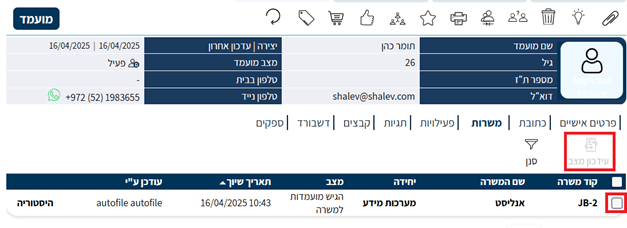
Selecting the "Invited to Interview" Status on the Status Update Screen:

  1. Select the “Invited to Interview” status.
  2. Additional fields will appear for you to fill in the invitation details.
  3. Make sure the “Send Invitation” option is selected in the “Send Message to Candidate” field.

Note — selecting the Select Email Only option will update the status but will not actually send the email.
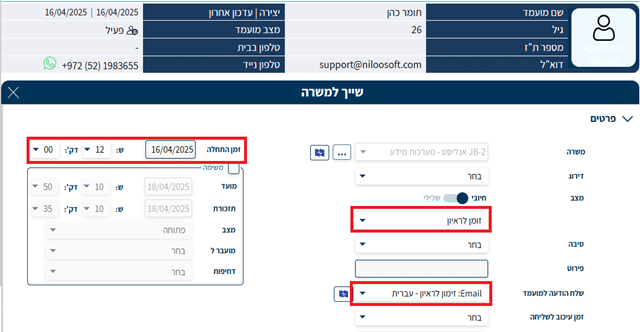
Setting Interview Invitation Details

Fill in the interview start time (date + time).
You can set a delay for sending the email — for example, scheduled to be sent 24 hours ahead.

After filling in all relevant fields, click Add.
This action will update the candidate’s status in the system and send the interview invitation according to the details you entered.

Confirming the Message

Note — when you click the Add button, an additional confirmation dialog will appear, alerting you that an interview invitation email will be sent to the candidate’s email address as defined in their card.
The message will be sent automatically from the configured organizational email and will be logged in the system.
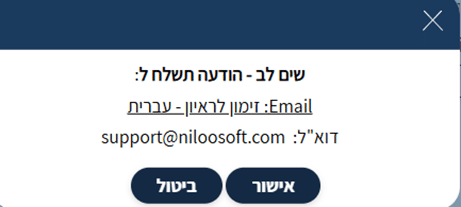
After Sending the Invitation


The candidate’s status will automatically update to Invited to Interview.

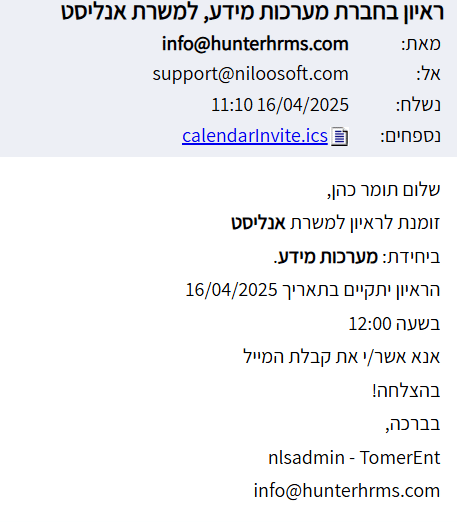
The invitation is automatically sent to the candidate’s calendar and to the calendar of the recruiter who performed the action in the system.
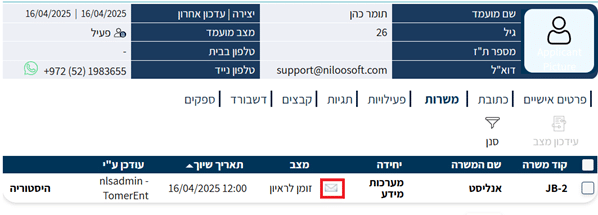
The invitation log will appear when you click the envelope icon to view the sent message:

  • Email address the message was sent to
  • Job details
  • Unit name
  • Interview date and time

This way, you can track all communication with the candidate in an organized and complete manner.

Using Custom Templates for Invitations


Hunter AI supports the configuration of custom email templates for each status, including the “Invited to Interview” status.
If you want to update the content sent to the candidate, you can access the template and make the following changes:

  • Customize the message wording to your organization’s language.
  • Add the interview address, location details, or a link to an online interview.
  • Include automatic variables from the system (candidate name, job title, time, and more).
  • Update the reply-to email address for responses or questions, if applicable.

These changes are saved in the template and applied automatically when the invitation is sent via the status.
For a detailed article explaining how to create a new template and link it to a status click here

Summary

The Hunter AI recruitment system enables you to coordinate interviews with candidates in an efficient, fast, and professional way.
By using smart statuses and built-in templates, you can maintain a consistent, documented, and accessible communication process — while improving the candidate experience and saving significant time for your recruitment teams.

Picture of Niloosoft Ltd.            Ask ChatGPT

Niloosoft Ltd. Ask ChatGPT

Niloosoft is a leading provider of an advanced system for managing and tracking the employee recruitment and human resources process.


Niloosoft offers its clients solutions in the fields of human resources management, recruitment process management, and customer relationship management (CRM). Our solutions are suitable for freelancers as well as HR departments in companies that recruit personnel for their own needs and manage the recruitment process with the organization’s managers through a single platform.

נילוסופט מובילה את מהפכת גיוס העובדים עם המערכת המתקדמת בעולם לניהול תהליך גיוס עובדים ומשאבי אנוש

השאירו פרטים ונדבר