



The HunterAI recruitment system allows 3 password entry attempts before your account is locked out for data security reasons.
There is a security policy requiring you to change your password every six months in order to maintain data security procedures. As your password expiration date approaches, the system will display a notification informing you that your password is about to expire and must be reset. This policy, as well as the password complexity requirements, can be customized according to your organization’s needs. For more details about updating the policy, please contact customer support.
In this article, we will cover two ways to reset your password: from the system login page and from within the system.
Password reset is completed by the user through a few simple steps.
Resetting Your Password from the Login Page:
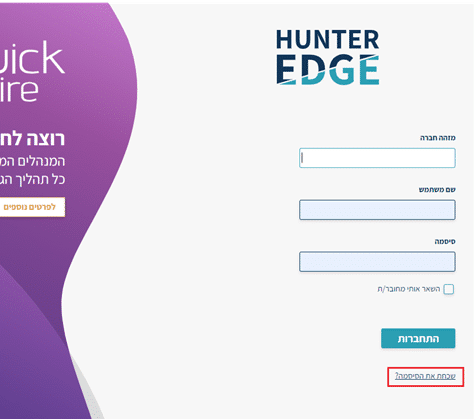
- Go to the main login page of the recruitment system and click “Forgot Password.”
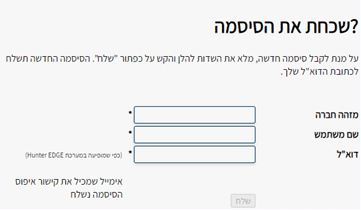
- Clicking this button will take you to a screen where you need to enter your full details (as they appear in the system): company ID, username, and email address. Once entered, click “Send”.
- After submitting, you will receive an email with a link to set your new password. Enter your new password and click Confirm.
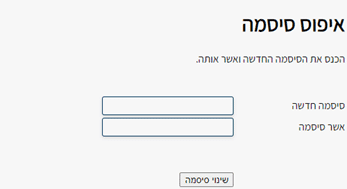
This action allows you to reset your password without needing to enter your current password.
Resetting Your Password from Within the System:
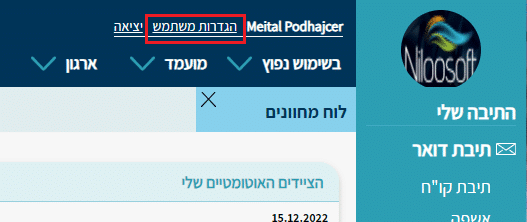
- While logged in, navigate to User Settings at the top of the page.
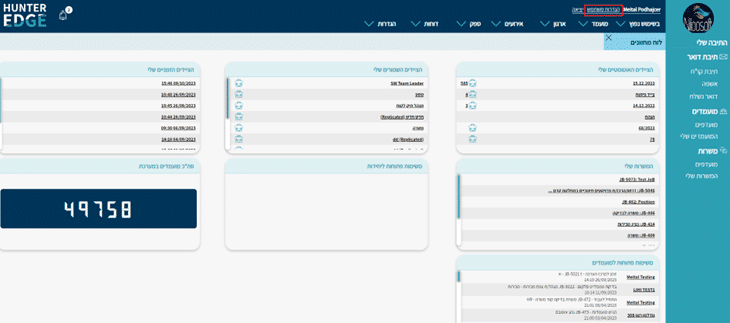
- Enter your current password, then enter the new password you want to use, and click “Save.”
Then log out and log back in to the system using your new password.
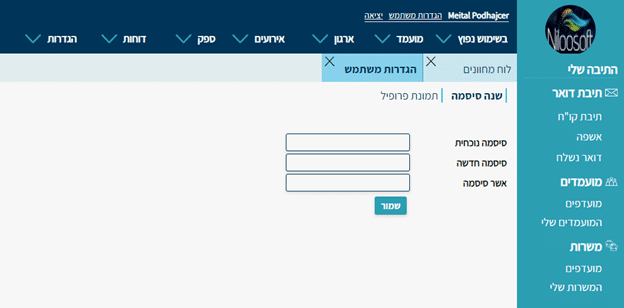
This option allows you to reset your password from within the system — useful when the system notifies you that your password is about to expire.
Key Requirements for Your New Password:
- The password must be at least 8 characters long.
- The password cannot contain sequential numbers (e.g., 1234).
- The password cannot contain your user details as they appear in the system (full name + username).
- It is recommended that the password include numbers.
If the password you enter does not meet the requirements listed above, you will see a notification that the password is invalid.
We are committed to protecting the data security of our clients, and therefore recommend changing your password every 3 months.
Did you reset your password but still can’t log in? Your account may have been locked due to failed login attempts. Please contact our support team at [email protected] and we will unlock your account so you can complete the password reset process.
Whether you reset your password from the login page or from the User Settings page within the system, both methods make it simple and straightforward to update your password.