



“`html
In the HunterAI recruitment system, we manage the relationship between job positions and candidates.
In order to match the best candidates to the job requirements, you need to set up the position in the system as precisely as possible, with the maximum number of parameters and information. This is to allow the system’s mechanisms — such as the Hunter, artificial intelligence, and more — to optimize the recruitment process and identify the most relevant candidates for the position requirements.
As part of working correctly with the system, you should ensure — as part of the system setup process — that all positions are created in the system with complete details, so that all that remains is to publish them on job posting platforms and receive candidates.
Before creating a position, you first need to make sure that all units/clients are set up in the system and that the position is created under the relevant entity.
There are two ways to create a position, both of which are presented in this article. Both lead to the same opening wizard and produce the same result — it is mainly a matter of convenience. You can choose whichever method works best for you, but make sure the position is created under the correct entity.
Creating a Position from a Unit/Client Card:
- Go to the unit/client under which you want to create the position.
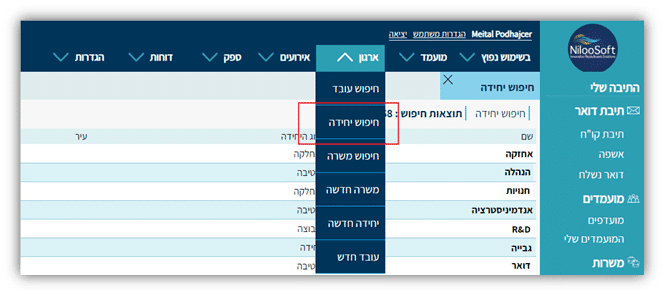
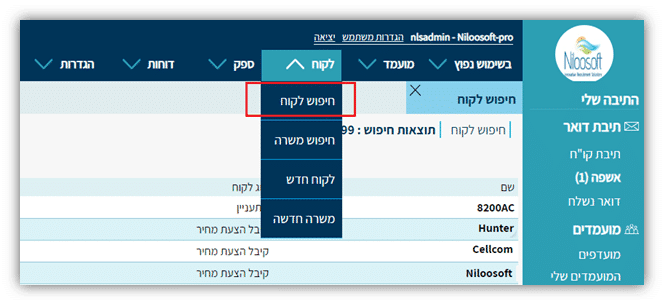
You can access units/clients via the top menu — Client Search or Unit Search. Clicking on the unit/client name in the search results page will take you to the entity itself.
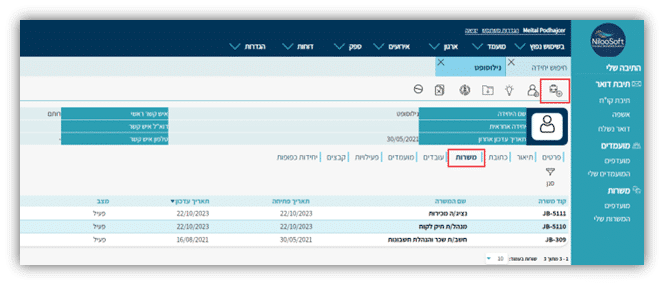
- Clicking the icon
 will open the position opening menu. You can see that each unit/client has its own positions in a separate column, keeping the system organized:
Opening a Position from the Menu:
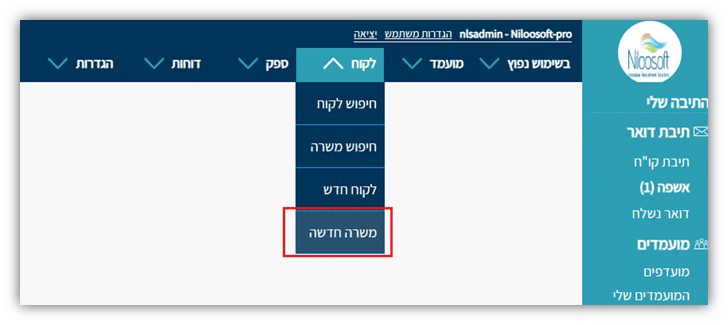
There are two ways to open a position from the menu, depending on your version of the recruitment system.
If you have the Staffing Agency version: Client -> New Position
If you have the Enterprise version: Organization -> New Position
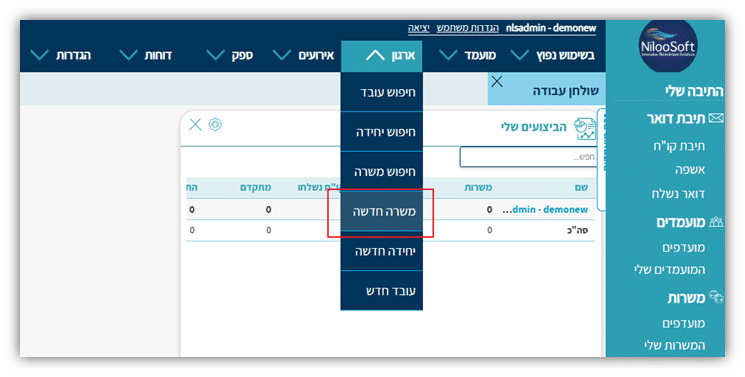
After completing either of the two methods above, you will arrive at the new position details page, where you can begin setting up the position by following the steps below.
Setting Up a New Position:
The process of creating a position — as with other entities in the system (department / client / supplier) — is done through a Help Wizard. This is a tool that guides you through the creation process step by step, organized into tabs by topic.
Clicking the “Next” button at the bottom of each tab will move you to the next tab and ensure optimal completion of all the most important details for creating the position (the wizard does not contain every field for the entity in question — it is designed to simplify and speed up the entity creation process). Once you have completed all the tabs, click “Finish” — if everything is correct, the position will be created in the system and you will be taken to the newly opened position card. You can then add additional information (if needed) in fields that were not included in the wizard.
- Position Details Tab:
In this section, fill in all the position details including the position name, divided into description, requirements, skills, and internal information.
Position Name – It is recommended to define the position name in a gender-inclusive way. For example: “Customer Service Representative (M/F)”
Description – A general description of the position and what the role involves
Requirements – The full and detailed position requirements as they will appear on the company website. It is recommended not to be brief here.
Skills – Specific abilities required for the position, such as: software used, management skills, licenses, certifications, etc. Here too, it is recommended to be thorough. Niloosoft’s AI systems will be more effective the more relevant information is provided.
It is recommended to add as much relevant information as possible, given that there is an option to publish the position directly from the system to a variety of recruitment sources.
Internal Information – Anything that should remain internal between recruiters and not be made public — for example: salary, benefits, and so on.
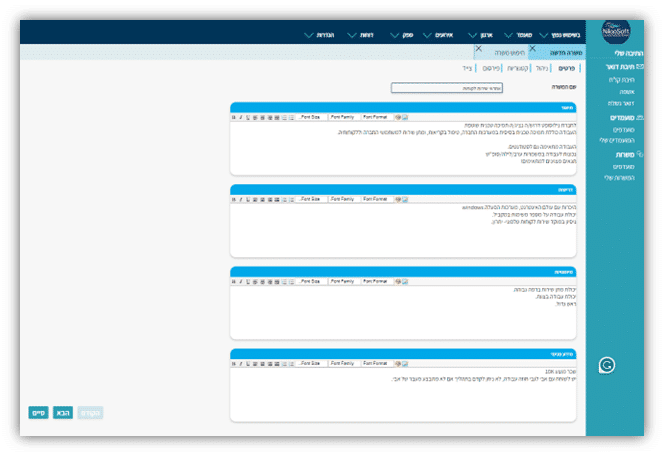
When done, click the “Next” button - Management Tab: In this tab, define the position recruiter, contact persons, and so on.
a. If the position wizard was opened using the second method, select the unit/client under which the position will be created. If you used the first method, the unit/client will already be selected. In the screenshot, you can see that the unit is already grayed out because the position was opened from the unit card. If the position had been opened using the second method, you would need to select the relevant unit/client.
b. Selecting a relevant contact person – The contact list comes from the unit/client card. Make sure contact persons are properly set up under the relevant unit/client.
Contact’s role – The contact person at the unit/client – what is their role in the company: Hiring Manager / CV Screener / CEO, etc.
c. Receives CVs – Yes/No: You can send the candidate’s CV to the professional manager directly from the system. If set to “Yes”, when sending a CV (by assigning the candidate to the dedicated CV-sending status), the system will automatically pull the contact person’s email address as defined when the position was created.
d. CV Required – If a CV file is mandatory, you can require the candidate to attach a CV when applying to the position’s landing page.
e. Confidential – If this is a confidential position, mark “Yes” in this field. This selection will affect the landing page
“`