

How to Close a Job Position in the Hunter AI Recruitment System?
In the Hunter AI recruitment system, managing job status (active, suspended, closed) is an important part of tracking the organization’s recruitment processes in an organized manner.
Closing a position is a clear indication that the recruitment process has actually ended – whether the position was filled or a decision was made not to continue recruiting, as opposed to suspending a position (which is a temporary action).
This action removes the position from visibility to new candidates, enables analysis and reporting, and maintains a clean and up-to-date structure of the organization’s job database.
Accessing the Job Card
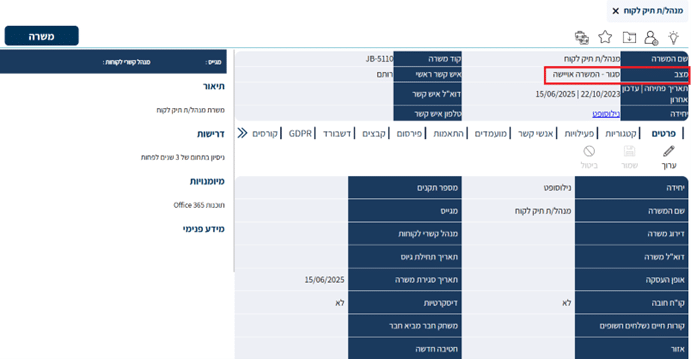
To begin the job closing process, navigate to the relevant job card (as shown in the image, we selected the Account Manager position).
For instructions on how to find a job in the system, see the article:
🔗 How to Search for a Job in the Recruitment System

Key Information in the Job Card
In the upper section of the job card, you will find the following information:
- Current job status – Active / Suspended / Closed.
- Job opening date.
- Last updated date – updated after every significant action performed.
Closing the Job Position
After accessing the job card, make sure the job status is set to Active / Suspended – this action is only possible for positions that have not yet been permanently closed in the system (highlighted in red in the image above).

Next, click the Close Job icon located at the top of the screen (highlighted in red in the image below).
This action will close the position and stop its visibility to new candidates, without deleting the job data or the candidates who have already applied.
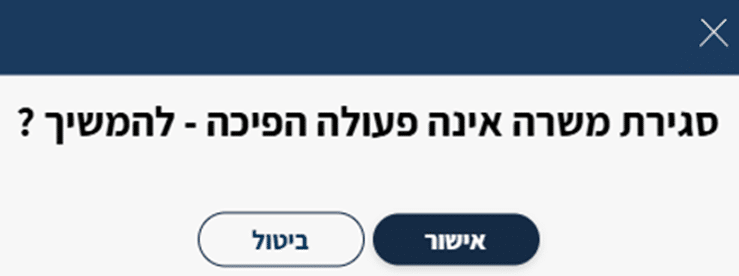
Closing the job is final and cannot be undone. After clicking, a warning dialog will appear notifying you that this is an irreversible action.
Confirming the action will permanently close the position – the job will be removed from visibility to new candidates and cannot be returned to active status.
Filling In the Closing Details
After clicking the Confirm button, the closing process dialog will open.

Here you will fill in the relevant fields:
- Reason for Closing – select the relevant reason from the list.
- Start Date – the date on which recruitment actually ended.
- Contact Person – specify the contact person responsible for the position.
Result After Closing
- The position will be updated with the status Closed + the reason you specified.
- New applications will no longer be accepted.
- The data will be retained for documentation, analysis, and historical purposes.

Reports on Closed Positions
Hunter AI allows you to generate reports on closed positions by:
- Time ranges (months, quarters)
- Organizational units
- Reason for closing the position
Using these reports, you can analyze trends, draw conclusions, and plan future recruitment processes in a data-driven and informed manner.
To learn about generating reports, refer to the relevant articles.
Summary
Closing a position is a natural step in the recruitment process, and it helps keep the system clean, up-to-date, and data-driven.
By accurately closing positions that have ended, you can generate reports, analyze recruitment sources, and track processes in an informed manner – without the risk of mixing data between active positions and positions that have already ended.